
When it comes to filming recipe videos, you really don’t need a complicated setup. These days, an iPhone, a tripod, and good lighting can get you surprisingly far, and that’s actually what a lot of food creators are using to create their content.
Our very own Lindsay from Pinch of Yum has nearly 2 million followers on Instagram, and much of her video content is filmed on just her iPhone!
Of course, there are plenty of reasons you might want to use a dedicated camera, and we’ll always be fans of good photography and video gear. But if you’re mainly creating content for Instagram, TikTok, YouTube Shorts, Pinterest, or other social platforms, you don’t need to spend thousands of dollars on a camera setup to get started.
So, what do we actually use to film recipe videos? Below, we’re sharing the gear that makes up our setup, from the phone we film with to the tripods, mounts, and lighting we use to make the process easier.
And once you have a simple setup you love, you can start getting a lot more out of every shoot. By the way, that’s exactly what we’re digging into in an upcoming Food Blogger Pro course, so stay tuned! For now, let’s start with the gear.
Here’s what we’ll cover:
- Which iPhone to use (and the settings that matter)
- Stands, tripods, and overhead rigs
- Microphones and audio
- Lighting
- Helpful extras, like monitoring, storage, and editing apps
This post contains affiliate links for products we love. Food Blogger Pro earns a small commission on these links at no cost to you, and the links will always be marked with an asterisk.
The camera: your iPhone
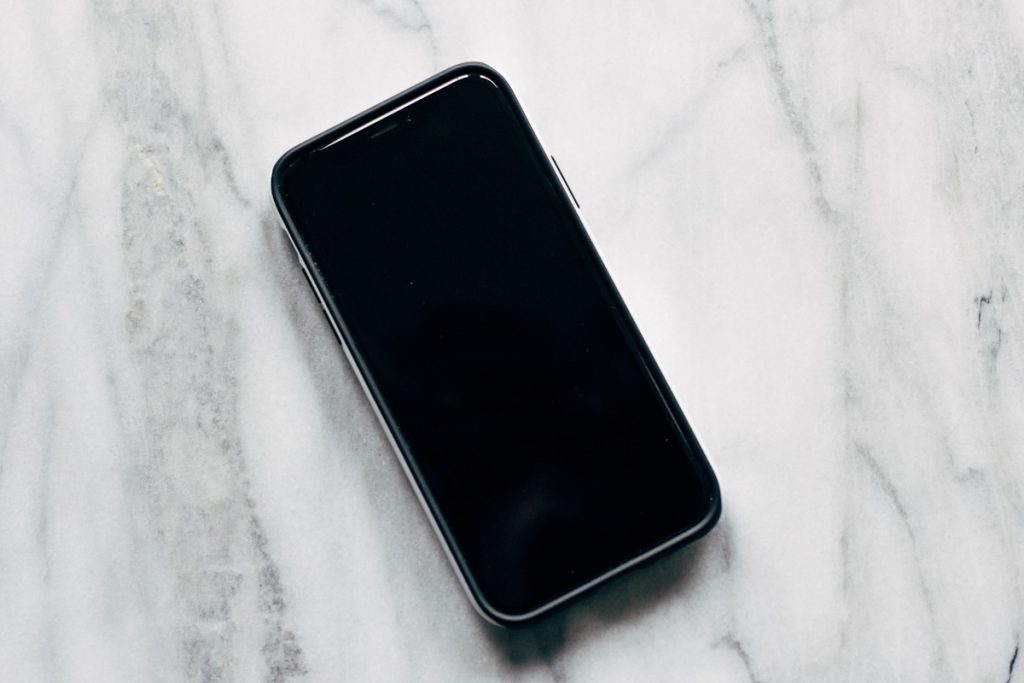
Any iPhone from the last few years can shoot great recipe videos. A Pro model mainly adds flexibility: more zoom options, higher frame rates for slow motion, and pro formats like ProRes and Log for color grading.
iPhone Options
- The iPhone you already have ($0): Seriously. Any iPhone that shoots 4K will do. Put the money toward a stand, a mic, and a light first.
- iPhone 18 Pro / Pro Max (from $1,199): The first iPhone with a variable aperture (ƒ/1.48 to ƒ/4), plus manual shutter, white balance, and aperture controls in the Camera app. It’s great for background blur on detail shots!
- iPhone 17 ($799): Shoots 4K at 60 fps with Dolby Vision. Everything most bloggers need for Reels, TikTok, and Shorts.
Settings that make the biggest difference
- Shoot 4K at 30 fps (or 24 fps for a more cinematic feel). Save 60 or 120 fps for slow-motion moments like pours, sizzles, and cheese pulls.
- Lock focus and exposure. Tap and hold on the food until you see AE/AF Lock, so the image doesn’t pulse every time your hands move through the frame.
- Stick with the 1x main camera for most shots. It has the best sensor. Use 2x or the telephoto for close-ups, and avoid the ultra-wide for overhead shots because it distorts plates and bowls.
- Think about your crop. Shooting overhead in 4K horizontal gives you room to crop a vertical 9:16 Reel and a horizontal YouTube or blog video from the same clip.
- Turn on Airplane mode or a Focus mode so a text doesn’t interrupt a 20-minute take.
- Wipe the lens. Kitchen fingerprints and steam are a very common cause of hazy iPhone footage.
Camera apps worth trying
- Blackmagic Camera (free): Pro-style controls, plus the ability to monitor and control your iPhone remotely from an iPad or a second iPhone.
- Built-in Camera app: Fast and reliable. On iPhone 18 Pro it now includes manual pro controls and a histogram.
- Final Cut Camera (free): Manual control over focus, exposure, and white balance. It also connects up to four iPhones or iPads to Final Cut Pro for iPad with Live Multicam, so you can capture overhead and side angles at the same time.
Stands, tripods, and overhead rigs
A stable stand is the single biggest upgrade you can make to iPhone recipe videos. For most recipe content, you’ll want two setups: an overhead rig that looks straight down at your cutting board or pan, and a side-angle stand at counter height for pours, sizzles, and the final bite.
The key for overhead shots is a horizontal arm that keeps tripod legs out of frame and holds the phone steady while you chop, whisk, and knead.
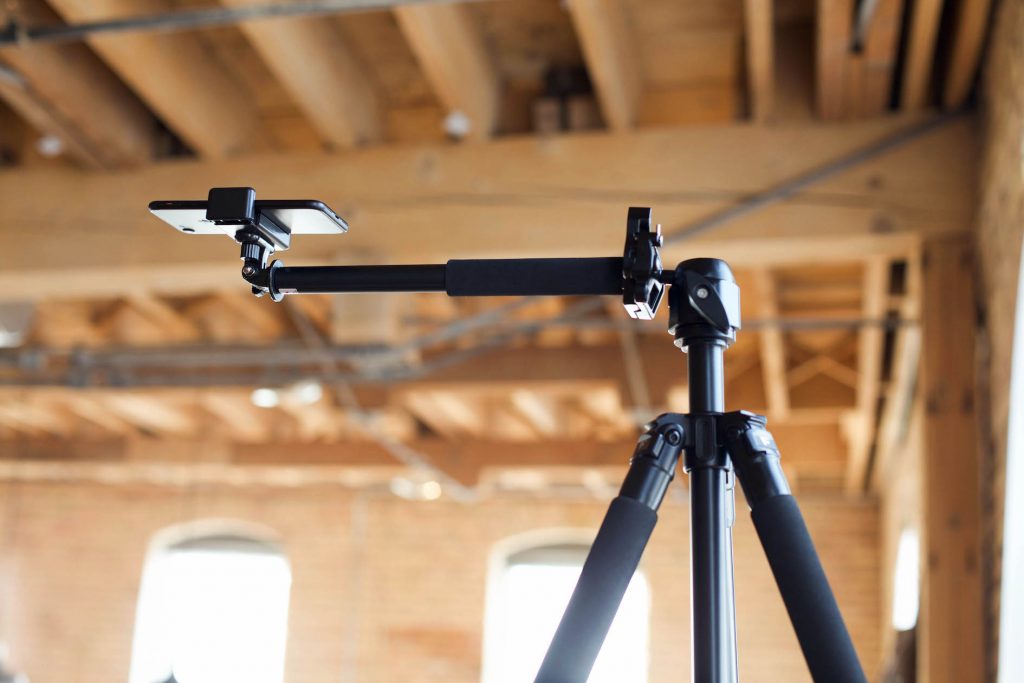
We really like using the Overhead Pro Tripod for iPhone videos. The nice thing about this tripod is that it has an arm. Since the camera is far away from the legs of the tripod, you’re not getting the legs in your shot. A smartphone is light enough that this very small tripod can support it, so it’s a great economical option.
Overhead options
- NEEWER DS009 Overhead Arm* ($25.99): Best for tight budgets. It clamps onto a light stand or desk stand you already own and extends 22 inches. Just note that you need a stand to attach it to, and it holds up to 5.5 lb.
- OverHead Pro Tripod Kit ($209): The easiest all-in-one overhead setup. The tripod and boom arm reach 5 feet high with a 2.8-foot arm, and the kit includes a phone clip and bullseye level. Hang a counterweight on the hook for stability. Already have a tripod? The arm alone is $129.
- NEEWER Pro C-Stand with Boom Arm* (from $189.99): Studio-level stability and height (up to 10.8 feet) for wide overhead shots of a full stovetop or table spread, and it doubles as a light stand. It has a big footprint, so always use a sandbag on the leg under the boom, and add a phone clamp.
Side-angle and on-the-go options
- A tabletop mini tripod (like a Manfrotto PIXI* or JOBY GorillaPod*) with a phone clamp is perfect for quick counter-height shots and behind-the-scenes clips.
- A standard light stand or lightweight photo tripod with a phone clamp gives you adjustable, eye-level side angles for pours and plating.
- A MagSafe mount (like this one from elitehood*) snaps your iPhone on and off in seconds. Pick one with twist-out grips or a locking design so the phone can’t slide off an overhead arm.
Tips for any stand
- Use a bubble level (or the level in the iPhone Camera app’s grid settings) so your overhead shots are perfectly square to the counter.
- Test for wobble before you hit record. Chop hard on your board and watch the preview. If it shakes, add a sandbag or shorten the arm.
- Shoot in landscape overhead if you’ll crop for multiple platforms, or rotate the clamp to vertical if the video is only for Reels and TikTok.
Audio: microphones for iPhone
If you talk to the camera, a wireless clip-on mic is the most important thing you’ll buy after a stand. The iPhone’s built-in mics pick up the whole room: the fridge hum, the range hood, the echo off your tile backsplash. A mic clipped a few inches from your mouth fixes that instantly.
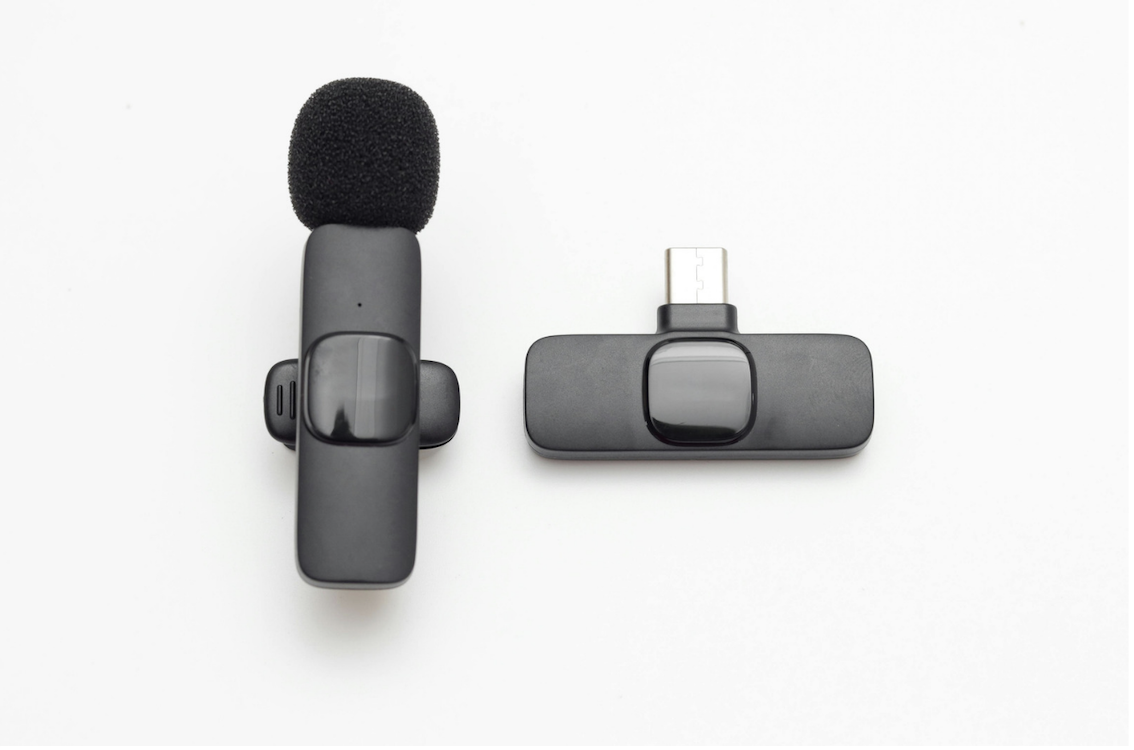
Today’s wireless mic kits plug straight into the iPhone’s USB-C port (older Lightning iPhones need the Lightning version or an adapter) and work with the built-in Camera app. No settings required.
Wireless clip-on mics
- BlueBolt PocketPro Mini Wireless Mic ($49.99): The most budget-friendly way to get clearer audio. This single-mic kit comes in USB-C and Lightning versions, has built-in noise cancellation, and weighs just 7 grams. It has a shorter range (about 65 feet) and battery life (up to 5 hours) than pricier kits, but that’s plenty for filming in your kitchen.
- DJI Mic Mini* ($79–$99.99): Tiny and light with an 8-hour battery, and it sounds far better than its size suggests. Our pick for most bloggers starting out.
- RØDE Wireless GO Gen 3* (about $169–$199): Pro-level reliability with 32-bit float, onboard backup recording, and timecode. Ideal if you also film with a second camera.
Why two mics? Most kits come with two transmitters. That’s perfect for filming with a partner, or for clipping the second mic near the stove to capture the sizzle.
Audio tips
- Turn off the range hood and dishwasher while you’re talking, and film the loud steps separately.
- Soften the room. A rug, curtains, or even a towel over the counter behind the camera cuts down on echo.
- Record a quick test and listen with headphones before every shoot.
Lighting
Good light matters even more on an iPhone than on a big camera. The iPhone’s small sensor gets noisy and muddy in dim kitchens, and it will happily shift color as clouds roll by. We still love natural light, but artificial light lets you film consistently any time of day, any season (a big deal for us here in Minnesota).
Start with free (and almost free) light
- Window light: Set up near a large window, ideally north-facing, for soft, even light that doesn’t change dramatically over a long shoot.
- Diffuse it: A sheer white curtain or an inexpensive photo diffuser softens harsh direct sun.
- Bounce it: A white foam core board from the craft store fills in dark shadows on the side of the food away from the window.
- Turn off the overhead lights. Mixing warm kitchen bulbs with daylight gives you odd color casts that are hard to fix.
Artificial light options
- Westcott Flex Cine Bi-Color 1′ x 1′ ($499.90 for the mat, kits from $999.90): A premium, lightweight, flexible LED mat that tucks into tight kitchen spaces. It’s pricey, and the dimmer is sold separately unless you buy a kit.
- NEEWER 2-Pack Bi-Color 660 LED Video Light* ($199): A budget-friendly two-light kit that comes with stands. Both panels are dimmable and bi-color, so you can light the main side and fill the shadows without buying anything else. It’s portable enough to set up and pack away around a busy kitchen.
- amaran 100x S Bi-Color* ($199): Our pick for a main “fake window” light. It’s a 100W bi-color LED with excellent color accuracy (CRI 96+) and app control, so you can dial in brightness and color temperature from your phone. Pair it with a Bowens-mount softbox, like the Light Dome SE, for soft, natural-looking light. The softbox and stand are sold separately unless you buy a kit.
Editing Software for Recipe Videos
- Edits by Instagram (free, iPhone): Quick Reels with captions, templates, and a built-in teleprompter, with no watermark.
- Final Cut Pro ($12.99/month in Apple Creator Studio, or $299.99 one-time on Mac): Our go-to for polished recipe videos on iPad and Mac. Synchronize Clips lines up your wireless mic audio in seconds.
- CapCut (free, with a paid Pro upgrade, iPhone): Fast, template-driven edits with auto captions, trending effects, and easy speed ramps for TikTok and Reels.
- InShot (free, with a paid Pro upgrade, iPhone): A simple, beginner-friendly editor for trimming, adding music and text, and resizing for each platform. The free version adds a watermark, and Pro removes it.
- Adobe Premiere mobile (free with some paid features, iPhone and iPad): If you’re already using Adobe Lightroom and/or Adobe Photoshop for your food photography, you might want to add another Adobe product to your workflow. Premiere Pro gives you a lot of control in terms of the final video, and is also great for those who are working on Windows computers – Final Cut Pro X and iMovie (below) are both only for Macs.
Want to learn more about editing? Check out our courses on editing in Final Cut Pro, Adobe Premiere Pro, CapCut and InShot courses!
Helpful extras
Monitoring: see your shot while you cook
When your iPhone is four feet above the counter, you can’t see the screen. Here are a few ways to keep an eye on framing and focus:
- Reflector 4 allows us to see what the phone is recording without having to look at the phone screen itself. It hooks up wirelessly and broadcasts your phone video onto your tablet or computer.
- An iPad or second iPhone: The free Blackmagic Camera app lets you monitor and control your iPhone remotely from another Apple device.
- Final Cut Camera + Final Cut Pro for iPad: Live Multicam connects up to four iPhones or iPads, so you can watch (and record) your overhead and side angles on one iPad screen.
- Apple Watch: The built-in Camera Remote app shows a live preview and starts or stops recording from your wrist.
- A Bluetooth remote: Many phone stands and tripods include one. It’s the cheapest way to start and stop recording without touching (and bumping) the phone.
Storage: video files are big
A few minutes of 4K ProRes can fill a 256GB iPhone in no time. On iPhone 15 Pro and newer, you can record ProRes directly to an external USB-C SSD. It needs to be exFAT-formatted and fast enough (at least 220 MB/s for 4K60, 440 MB/s for 4K120). Portable SSDs like the Samsung T7 Shield* and SanDisk Extreme* are popular choices. For everyday HEVC footage, iCloud Photos or Google Drive works well for backing up and sharing with your team.
Gimbal: for moving shots
You don’t need a gimbal for tabletop recipe videos, since a stand is steadier. But if you film farmers’ market trips, restaurant visits, or walk-and-talk videos, a gimbal like the DJI Osmo Mobile 8* ($159) smooths out every step. It also supports Apple DockKit for subject tracking in the iPhone Camera app.
You don’t need the studio kit to make recipe videos people love. Some of the most-watched Reels we’ve ever posted were filmed on a phone. Start with your iPhone, a steady stand, and good window light. Add a mic when you start talking to the camera, and add lights when the seasons (or your schedule) start fighting you.
Want to learn more about recipe video equipment and settings? Watch our Creating Vertical Short-Form Videos course!
What about you? What’s in your recipe video kit right now? Is there a stand, mic, or app you can’t live without? We’d love to hear about it in the comments below.
Hey Bjork – thanks for putting this together. I’m getting started with my own YouTube channel, and while have a few videos already up there that were shot professionally, I’d like to try to shoot some on my own. My super quick question for you is in regards to using the iPhone for audio. I’d like to test this out, but was curious if there was a particular app your’e using or if you’re just recording it using one of the built in tools. Thanks so much for sharing all your wisdom with us!
Awesome! Happy to hear that you’re giving it a go on your own Alyssa. It’s really nice to have someone help with video but it can quickly get really expensive. :/
I actually just record a video with the iPhone and then just place it close to the subject (Lindsay in this case). Then I import that video into FCPX but only use the audio.
Super helpful, thanks!!
One final question for you – do you create those final screens on your videos (where it shows what to check out next) in a program other than FCPX?
Those are done in FCPX. We just drop in and shrink down the previous videos and then drop in an annotation in YouTube.
Hey Bjork, that’s great! I had been considering to shoot recipe videos for YouTube for a long time.
The gear you use is incredible, I always hear people talking about DSLR video shooting. I never tried, but…
I use a professional camera, the Canon EOS C500, it’s not a DSLR, it’s a cinema camera that can shot RAW 4K. The lenses is a kit of all the CINE lenses by Canon, but I can use the same lenses that I use on my 1DX.
For the editing part, I use the Adobe Premiere Pro, I LOVE IT! I tried so many different options, but no one works well for me as Premiere Pro.
Like, I shoot in RAW, so I need to do colour correction in the video, so I use the software Davinci Resolve with the control surface.
I use two Wacom tablets, The Intuos Pro – That i also use to edit my photos – And the Cintiq 24HD Touch.
I know, it’s very complex, time consuming, but that’s my favourite way to work. Sometimes, when I’m shooting a video, editing the video, I stop and think ‘Am I shooting a video for YouTube, or a Hollywood Blockbuster?’
I Loved this post Bjork, thanks for sharing with us. =D
Your gear is INCREDIBLE! Really, really cool.
Do you have any examples of videos that you’ve shot in the past? I’d love to check ’em out.
Hey Bjork,
At this moment I don’t have any because I’m shooting a project for a friend, and he wants to keep the project in secret.
But, when I finish this project, or he give up – what comes first – I will record a recipe video using a recipe from Pinch of Yum, and I will post on Food Blogger Pro along with a Behind the Scenes.
😀
Sounds good! I’d love to see it. Thanks!
Hey Bjork,
thanks for the post, I think your set up makes a lot of sense. Actually, I would have gone for the same, if I had the money for it. Went for some cheaper solutions, that are also fine for now 🙂
I started my youtube channel about 3 months ago and wrote a little article about my experience. Check it out, if you like: http://hurrythefoodup.com/a…
Btw, I wanted to comment on topics in the community forum, but I couldnt. Is it only possible for paying members?
Best,
Howie
Awesome! Congrats on getting up and running with that and good work getting Gordon Ramsay to come on. 🙂
Yep. Forums are open for reading but only members can post.
Keep up the good work Howie!
haha, thanks 🙂
Ah, ok! Thanks for the info.
You probably already thought about it: Add a call to action button a la “want to post something? Get Premium!” somewhere around the thread.
I was a little lost searchin for the “post” button 😉
Great feedback Howie. It’s on our (very long) to do list. 🙂 A good reminder to prioritize that.
Should I use canon 90d or 7d mark ii? This post is old???
Hi, Cen!
This post just has some of our best recommendations when it comes to cameras and gear for video photos. We highly recommend the Canon EOS 7D Mark II if you’re looking for a good option!
Hi Bjork!
Great info here on getting set up for YouTube 🙂
I use the Zoom recorder also but it is hooked up to the more economical Audio 2000’s wireless mic system which has served me well this past year. I also shoot with three cameras: Canon Vixia HFM300 which are about four years old and my point of sharing these cameras, is that you don’t need the shiniest new camera on the market to produce great quality video. Please note that I REALLY DO want to upgrade to a DLSR next year for improved visuals, especially depth of field.
The two items that saves my butt every shoot is to have cameras with wireless remotes and very stable tripods with dollies to move around.
I do not edit my own footage, I have that professionally outsourced, but I do edit some of my smaller shoots (Tips and such) with Adobe Premier Elements 11 and that serves me very well.
Gary
Thanks so much for sharing Gary! For anyone reading the comments you can check out Gary’s channel here: https://www.youtube.com/cha…
Dollies! The thought never even crossed my mind. What do you use?
The dolly’s make my life so much easier, moving them from inside the house to my outdoor set, repositioning my cameras, etc Here is the dolly that I am using: https://www.amazon.com/dp/B0077M2958/ and https://www.amazon.com/dp/B000YB862E/
This is a picture of one of my rigs with the dolly attached and a 7″ LCD monitor. I used the sun shade for obvious reasons.
I also use a homemade 4ft jib crane.
Gary
Brilliant. Thanks for those links Gary. Others will find that helpful as well.
I didn’t see the picture. Did it maybe not upload?
I can’t seem to get the photo’s to upload Bjork.. not sure why???
Weird! What file type are they? Not sure why that would be happening.
Feel free to email them to me and I can upload.
This turned into a bigger project than you were asking for. 🙂 Sorry about that!
Here they are! Thanks Gary.
Here you go! Perhaps I had the files to large last time?
dolly photo
Great info! ( as usual)
I just got a canon 6d and I have noticed that the camera doesnt have AF ( auto focus).. I tried to record a mini cooking video and when my hands moved they got unfocused. How do do guys get the videos focused usinf the 6d? Do you manually focus it constantly? …I got into forums to figure this out but no clear answers… Thanks very very much Bjork for being do generous! The food photography I purchased from you guys is priceless!! Thanks
Great info I would also add in lighting 🙂 When we started adding in some cheap lighting it made a world of difference in the quality of shot we could get. We use the 1.8 (although Nikkon) for the food shots but go to like 2.4 for face/interview style shots of Lacey’s face 🙂 Thanks for the post
Great point Dustin. Our hope is to shoot in natural light as much as possible, but we’re Minnesota people which means really early sunsets in the winter. Lighting will be an important item to add to the list.
Hi Bjork thanks for this post. Lindsay just sent me the link. So one “newbee” question. Given the 6D doesn’t have a headphone jack I assume the audio is recorded separately and then you sync it together correct? Is this hard to do or does synchronize clips make it fairly easy? Thanks again for this information.
Cindy
Yep! You got it Cindy.
Check out #1 on this post: https://www.foodbloggerpro…
Thanks Bjork. Audio is so important and this will be a big help. Thanks!
Thanks for this! I have literally been making mine with my iphone in my hand. I can’t wait to get a tripod!
I ordered the Overhead Pro Tripod as their website says it can be use for both iPhone and DSLR but it’s not the easiest tripod to use. I find the release gets stuck, the ball head is constantly moving even when tightened all the way, the legs are not the easiest to adjust and when adding an arm for the DSLR (which they say can be use on their tripod) it’s impossible to adjust the legs out of the frame. I’m a little frustrated with the product and want to return it. Aren’t there attachments for the iPhone that can be purchased for most arms? Really wish I had not purchased this and just gone for a more substantial tripod. Looking at your photo for overhead videos and wondering how the camera is attached to that Manfrotto arm?
A wonderful post. Thank you for generously sharing all that you have learned. I have a quick question. My Nikon D5100 will only record for 20minutes. Is there a way to work around this or do all of the cameras you recommend have unlimited time to avoid the recording stopping mid recipe? Thanks in advance and thank you again for this post.
I make cooking videos from my mobile phone, which camera should i purchase to make cooking videos
Please suggest
My biggest question is related to steam. How do you keep from steam up your camera leans?
Hi there! Can you try a fan? Position it so that it blows the steam out rather than up to your lens. 🙂
I also had this question about the stem fogging up the camera lens. Is this all you need, a fan? Is there any other special equipment that you need to buy to stop your lens from fogging up when taking overhead cooking videos? I’m interested to know what Pinch of Yum uses and also what other food bloggers use.
Hi Chrissie! Great question. I asked Lindsay (Pinch of Yum) and she said:
“We have used a fan in the past, but at this point in time, we just take a big reflector and wave it around! But it’s a little easier because there’s two of us working on it (me cooking and Landon filming).”
Not exactly high-tech, but gets the job done!
I used to shoot cooking videos for my youtube channel.But i had no idea about shooting cooking videos like angle knowledge or anything. Whatever i shoot with common sense.I used to shoot with my mobile phone Samsung glaxy J7. I shot my videos horizentally. The most difficult part was audio qulaity as i had know knowledge about mikes or microphone. Video quality was fine but i was not happy with the audio quality that my video had.Background unecssray noise.Editing was very tedious process for me I hate that part.Inspite of spending lot of time in editing my video didnt come out to be good quality one.But now Iam learning bit by bit So will start shooting again😊
Hi!
I’ve been trying to find out how to edit if I record a cooking video with my Canon Rebel T6 and iPhone at the same time (like iPhone overhead and DSLR at 45 degrees). There aren’t many resources for that scenario. Does anyone do that or do people use two DSLRs? I did read that I can download my DSLR footage into iMovie so I suppose I can edit the footage from both my iPhone and DSLR together in iMovie? I haven’t tried but wasn’t sure if it works together…
I’d love your opinion!
Thank you!
Radka
Hey, Radka!
We’re big fans of using what you have and then upgrading when the time feels right. You can certainly use you iPhone and your Canon together! We’re recommend using the Canon for the overhead shots and then your phone for the side-angles. 😊
Good luck!
I made many cooking demonstration videos for my 8 th grade foods classes. Nothing professional just a camcorder. I think I posted about 39 on YouTube.
That’s amazing! Way to go, Chris!
Hey Bjork! When editing video for the blog post, is it better to use a vertical or horizontal orientation? 75% of my audience it on mobile devices, but it seems everyone is using horizontal. Is there a reason for that?
Thank you so much!
Great question, Jamie!
I think the reason that a lot of bloggers use horizontal videos for blog posts is that they’re embedding the videos using YouTube or an ad network like Mediavine or AdThrive. All those tools have specific requirements when it comes to uploading videos, so if you use them, you have to adhere to their specific orientation requirements.
I hope that helps — let us know if you have any other questions!
Hi my name is Allee I have a food blog I started called Allee’s House. I have a
small following on Tik Tok starting at 15.5 K and have trouble growing Instagram. I also need to learn how to allow adds on my website and maybe tightly that up as well. I’d love to learn more professional ways to share my recipes. Also, a dream of mine is to one day publish a cookbook. Would love any guidance, classes, anything I can do to learn more. I love pinch of yum and all your amazing recipes. Thank you so much!
Hi, Allee!
15.5k on TikTok?! That’s incredible! I have no doubt that your Instagram following will grow as well.
In terms of ads, we do have a blog post all about the most popular ad networks for food bloggers here. It will hopefully get you pointed in the right direction! We also have a course on Food Blogger Pro all about Understanding Ads that goes into a bit more depth.
I’d also recommend checking out our podcast if you haven’t yet! We’re doing a series right now called ‘From Blogger to Cookbook Author,’ and it explores what it takes to publish a cookbook as a blogger.
I hope that helps — let me know if you have any other questions! 🙂
Hey guys, great article, I was just wondering are there any updates to either main camera (currently discontinued) or the side angle camera? Also I couldn’t find the mount for the FeelWorld screen, looks like you are somehow hanging it on an arm.
Apologies if the questions are basic, but I am just starting to look at serious gear.
Thanks for reading — we’re glad you enjoyed the article! I think the main camera and the side angle cameras might be available on some other retailer’s websites. Are you able to find them elsewhere?
Also, I asked our Video Specialist about your second question, and she said she uses some clamps and various arms depending on the setup. She can’t find specific links, but here is something similar to what she uses (she would just recommend that you figure out where you want to mount your monitor and then get clamps/arms that will allow you to mount it there):
Photography Super Clamp
SUPON Camera Super Clamp
Thanks for sharing. It’s a very informative blog.
The DSLR camera lenses, now and again called the “eye” of the camera, is seemingly the main part of the camera. The further developed you become, the more you will be gone up against with different specialized terms. Sooner or later, you’ll most likely likewise need to update your lenses past the standard unit form you initially got with your camera.
We’re so glad you enjoyed the post! And great point — that’s so true!
Great information! Thank you so much for breaking down the details.
Glad you found the post useful! Thanks for reading.
Good article and thank you. Eight years now in this industry with filming manufacturing videos and you can never know enough in this field! Ha. https://industreel.net
Agree! There is always more to learn. 😅
I noticed in your earlier lessons/videos Pinch of Yum was using two 7D mark 2(crop sensor), one for overhead and another for side view. But in this article it mentions that you are using the 5D mark 4(full frame) for overhead. What is your reason for switching to the full frame camera for overhead? Also is there a reason you prefer a crop sensor for your side angle?
Hi Chelene! Great question, I’ve reached out to Lindsay at Pinch of Yum and will get back to you with her response!
From Lindsay –> I think I made the switch years ago because Bjork recommended it! I think full frame is generally considered to be higher quality than a crop frame. And at this point I’m using that 5D Mark 4 for all my photos (well, that and a phone)!
Hope that helps!
Loved this post! It’s so helpful to see the specific gear you use for recipe videos. I’ve been looking to up my video production game, and your recommendations are super insightful. Thanks for sharing!
Happy to hear you found it useful! Best of luck – we can’t wait to see the videos you create!